Sending PDFs by email in 2026 is still common for work, study, applications, and sharing documents. However, large PDF files often exceed email attachment limits, take longer to upload, or fail to send entirely.
High-resolution images, scanned pages, and unnecessary elements can quickly increase file size. Check More Here: How to Fill Interactive PDF Forms in 2026
This guide explains how to reduce PDF size for email in 2026 using simple, safe, and effective methods. You’ll learn practical ways to compress PDFs without ruining quality and how to choose the best approach based on your needs.
Why PDFs become too large for email
PDFs usually grow in size because of embedded images, scanned pages, custom fonts, and unnecessary metadata. Scanners and cameras often create very large image files that get embedded directly into PDFs.
Email providers typically limit attachments to a certain size, making compression necessary before sending.
Understanding email attachment size limits
Most email services allow attachments up to a specific size, often between 20 MB and 25 MB. Even if your email provider supports larger files, recipients may have stricter limits.
Reducing PDF size improves compatibility and ensures smooth delivery.
Reduce PDF size using online compression tools
Online PDF compressors are one of the fastest ways to reduce file size. You upload the PDF, choose a compression level, and download the optimized version.
These tools work directly in your browser and are ideal for quick email attachments.
Choosing the right compression level
Most tools offer different compression levels. High compression reduces size significantly but may lower image quality. Medium compression balances clarity and file size, which is usually best for emails.
Choose compression based on whether the PDF is text-heavy or image-heavy.
Reduce PDF size using built-in PDF software
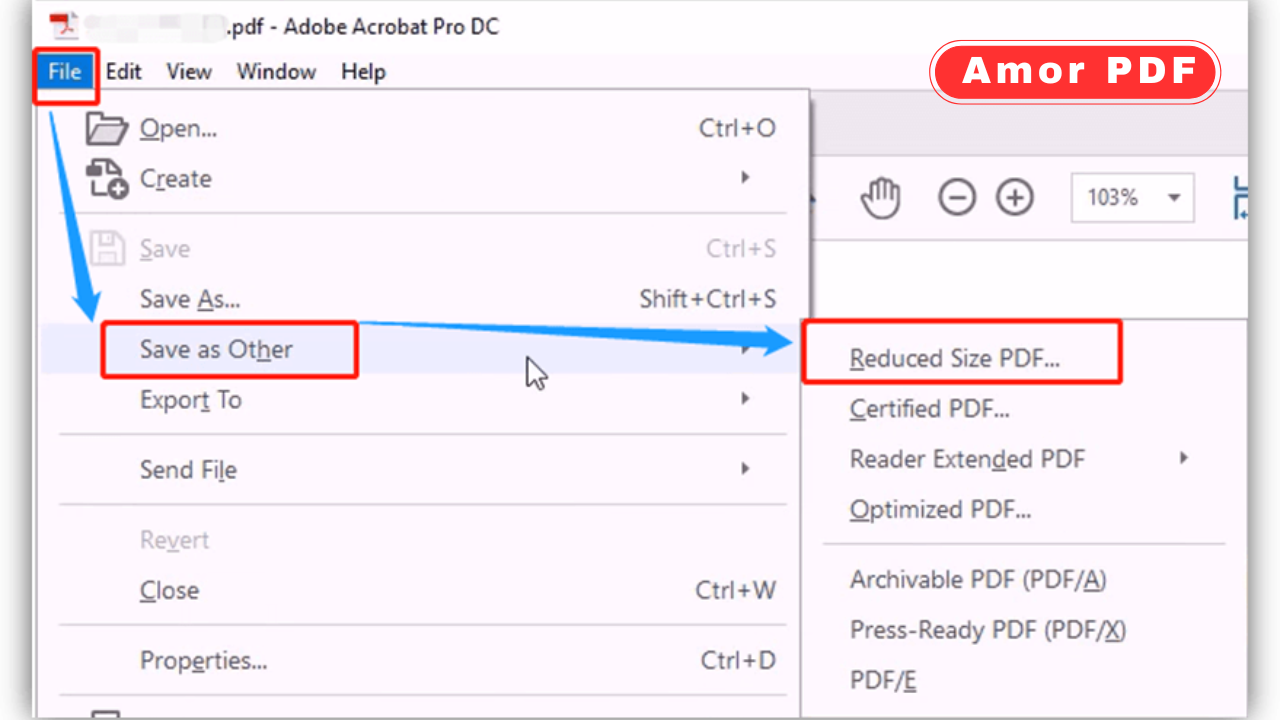
Many PDF readers and editors include built-in optimization features. These allow you to save a reduced-size version of the file without external tools.
Built-in options are useful when handling sensitive documents that you don’t want to upload online.

Convert scanned PDFs to optimized PDFs
Scanned PDFs are often much larger than necessary. Optimizing scanned files by reducing image resolution can dramatically decrease file size.
Text-based documents do not need high-resolution images, especially for email sharing.
Remove unnecessary images and pages
If the PDF contains extra pages, blank pages, or decorative images, removing them reduces size instantly.
Keeping only essential content makes the PDF smaller and more professional.
Compress images inside the PDF
Images are the biggest contributors to large PDFs. Compressing images inside the document reduces size without affecting readability.
Lowering image resolution is usually unnoticeable for on-screen viewing.
Save PDFs in grayscale when possible
Color PDFs are larger than grayscale ones. If color is not necessary, converting the document to grayscale can significantly reduce file size.
This is especially effective for scanned documents and forms.
Flatten layers and annotations
Some PDFs contain layers, comments, or form elements that increase size. Flattening the PDF merges these elements into a single layer.
Flattened PDFs are smaller and more email-friendly.
Remove embedded fonts if not needed
Embedded fonts can add unnecessary size to a PDF. Removing unused or duplicate fonts reduces file weight.
Standard fonts usually display correctly without embedding.
Split large PDFs into smaller files
If compression isn’t enough, splitting a PDF into smaller parts is another solution. You can send multiple emails or attachments instead of one oversized file.
This approach works well for long reports or scanned documents.
Save the PDF using optimized settings
Many PDF tools offer “optimized” or “reduced size” save options. These automatically balance quality and size.
Always use these options when preparing PDFs for email.
Avoid printing to PDF unnecessarily
Printing a document to PDF can sometimes increase file size, especially if print settings are set to high quality.
Saving or exporting directly to PDF usually produces smaller files.
Check PDF size before sending
Always check the final file size before attaching it to an email. This prevents sending failures and saves time.
Testing by attaching the file to a draft email helps confirm compatibility.
Security considerations when compressing PDFs online
When using online tools, avoid uploading sensitive documents to unknown websites. Trusted tools usually delete files automatically after processing.
For confidential documents, offline compression is safer.
Free vs paid PDF compression tools
Free tools handle basic compression well for most users. Paid tools offer advanced options like batch processing, OCR optimization, and fine control over quality.
For email purposes, free tools are usually sufficient.
Why smaller PDFs improve communication
Smaller PDFs upload faster, download quicker, and are easier to open on all devices. Recipients are more likely to receive and view the document without issues.
Reducing file size improves overall communication efficiency.
PDF compression trends in 2026
In 2026, PDF compression tools use smarter algorithms to preserve quality while reducing size. Automation and AI-assisted optimization are making compression faster and more accurate.
This means better results with less effort.
Conclusion
Reducing PDF size for email in 2026 is easy with the right approach. Whether you use online compressors, built-in optimization features, or manual adjustments like image compression and grayscale conversion, you can significantly shrink PDFs without losing readability. Smaller PDFs ensure smooth email delivery and a better experience for recipients. For official guidance and professional PDF optimization tools, you can also explore information available at https://www.adobe.com.
FAQs
Why is my PDF too large to email?
Large images, scanned pages, and embedded fonts usually increase file size.
Will compressing a PDF reduce quality?
Slightly, but with medium compression the difference is rarely noticeable.
Can I reduce PDF size without installing software?
Yes, online PDF compressors work directly in your browser.
Is it safe to compress PDFs online?
It is safe when using reputable tools, but avoid uploading sensitive documents.
What is the best PDF size for email?
Keeping PDFs under 10–15 MB ensures compatibility with most email providers.